Credits versus discounts
SiteLink by Storable does not allow a credit to be created on an account without a charge to apply it against. Credits can only be created after a charge is created, while discounts can only be created during charge creation. This means that if there are no charges on an account, you would need to create one before applying a credit.
Create a future charge in order to apply a credit
If a charge does not exist, you will need to create one in order to apply the credit.
1. From the Operations screen in SiteLink Web Edition, click Payments. |
|
2. Select a tenant from the list and click Next or double-click on the tenant. |
|
3. Check the box labeled Make Future Charges. |
|
|
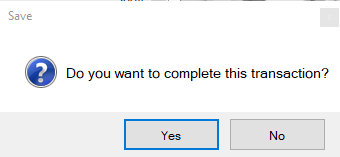
4. Click OK and then Yes in the pop-up window to complete the transaction. Now that the charge has been created, proceed to the steps below to apply the credit to a charge. |


Apply a credit against an existing charge
1. From the Operations screen, click Payments. |
|
2. Double-click the unit that needs to be credited, and then click Edit Charges & Payments in the bottom right-hand corner. |
|
|
3. In the Edit Charges and Payments screen, you will see a Credit column. For each charge that you want to credit, type the amount you want to credit (either partially or in full) directly into that column. When you enter the values, they will appear in green under the credit column, and the total will update. |
|
4. Once finished, click OK at the bottom of the screen. |
|
5. This will take you back to the initial payment screen for that unit. Click OK again. |
|
|
6. Click Yes in the pop-up window to complete the transaction.
Depending on your default settings, you may then have the option to print or email a receipt. |